Jolliment
Jolliment
Loading
Almost there.
Jolliment
Loading
Almost there.
Turn one photo into nine matching stickers. First static pack free.
This usually takes a few seconds.
Photo to stickers in one step: upload a single picture and get nine matching stickers of the same subject — background removed, transparent, 512 × 512, ready to import into a chat app. Selfies, pets and photos of friends all work.

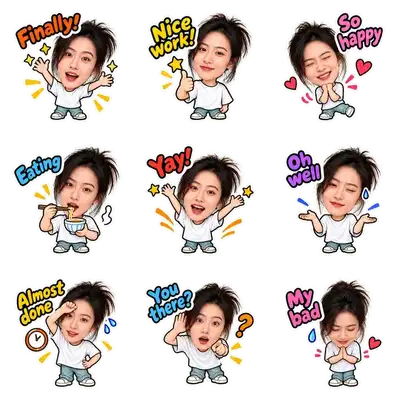

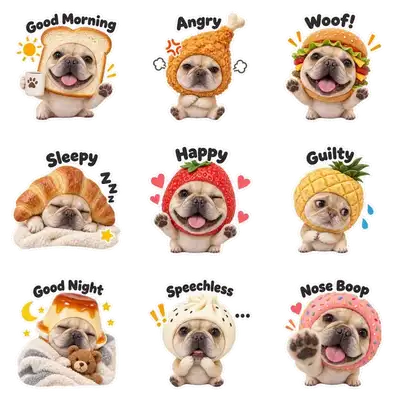

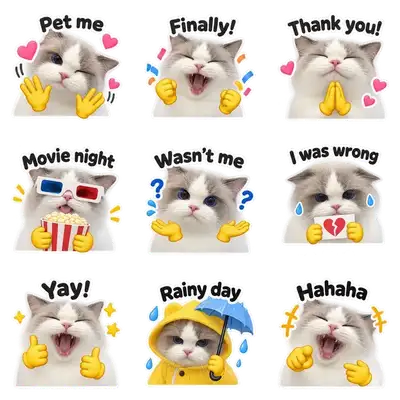
Six example packs, each made from a single photo — every pack is nine matching stickers.
You can turn a photo into a sticker without any design app: upload one clear picture, pick a style, and Jolliment cuts the subject out and turns your photo into a full set of stickers. Every sticker is a transparent PNG, so the same set works in WhatsApp, iMessage, Telegram and Discord — no extra export step. If you have ever wondered how to turn a photo into a sticker while keeping clean edges, that cut-out step is what makes the difference.
If you want to make emoji from a photo instead of drawing them, you do not need a separate emoji app: upload the picture you already have, choose a style, and the same cut-out step turns it into a set of emoji-sized stickers with transparent backgrounds. Each one is small enough to read in a chat bubble and sharp enough to stay clean on a Retina screen. People usually make emoji from a photo of a pet, a friend, or a selfie — the result is a pack that looks hand-made for that one subject, not a generic emoji set.
You upload a photo once and get a whole sticker pack: nine stickers of the same face or pet in nine poses and expressions, so the set reads as one set when someone scrolls through it. The photo sticker maker removes the background for you. Pick the look before you generate — the style picker above lists them.
Selfies are the obvious use, and pet photos work just as well — a clear photo of a cat, dog, puppy or other animal is all the generator needs, because it only needs one face. You get nine cat stickers, dog stickers or selfie stickers of your own animal rather than a generic cartoon pet. That is the difference between pet stickers you keep using and a set you forget.
The pack is nine square files with a transparent background — the format chat apps expect. The same pack works across apps; only the import step differs.
Full per-app steps are in how to add stickers in each app.
Motion is the part most tools skip: they are still-image only, not an animated sticker maker. Some styles come with an animated version as well — that style returns a still set of nine PNG files and an animated set (WebP, plus a ZIP with GIF and WebM). Animated WebP keeps both the transparency and the movement, which is why Telegram accepts it directly. On Discord the animated format is APNG, and on WhatsApp the clean route is still the pack file. Animated versions cost extra credits — see pricing.

One sticker from an animated set — a single WebP file, about 50 KB, transparent background.
Chat stickers — what this page is about
Digital images with a transparent background that you import into a messaging app: WhatsApp, Telegram, iMessage, WeChat, Instagram or Discord. Nothing is printed. Still stickers are PNG; animated stickers are WebP (or a pack file). Square, usually 512 × 512.
Printed stickers — not what we do
Printed on sticker paper or vinyl, or ordered from a print shop: car decals, laptop stickers, journal stickers, sticker printers. If you searched for a sticker printer or sticker paper, that is a different job — we only make the digital kind.
One upload returns a set of nine stickers that match each other, with the background removed.
No. It runs in your browser — upload a photo, pick a look, download the pack. Nothing to install.
Upload the photo, pick a style, and Jolliment returns nine stickers of the same subject with the background removed. Each file is a square 512 × 512 image with a transparent background — the size chat apps expect.
Yes. Any clear photo works, including ones already on your phone. You do not need a design tool: the background removal and the set of nine are done for you.
That is exactly what this does. Instead of drawing one sticker at a time, you upload one photo and get a whole pack — nine stickers, the same subject, nine different expressions.
Yes — a picture and a photo mean the same thing here. Upload the image, pick a style, and download the pack. A single sticker is possible too, but a pack is what chat apps import.
Yes. Pets work well because a clear photo of a face is all that is needed. You get nine stickers of the same animal, which is useful for group chats and reactions.
Nine, all made from the one photo you upload. WhatsApp packs are typically imported as a set, so nine is enough to cover common reactions without filling up your sticker tray.
Yes. WhatsApp imports a .wastickers pack file through a free sticker app, once. After that the pack stays in your sticker tray. Our step-by-step guide covers the exact taps.
Yes — the same nine files work across apps, but each one imports them differently. iMessage uses stickers saved to Photos and added with “Add Sticker”; Telegram takes the WebP files or a pack built by its bot; Discord accepts the images as emoji or stickers.
The background was not fully removed — usually because it was close in color to the subject, or because the file was saved as JPEG. JPEG cannot store transparency, so the edge becomes solid. Export as PNG or WebP instead.
Your first static pack is free. You sign in with an email when you download it.
About a minute per pack.
Photos are removed within about 15 minutes of upload and are not used as training data. Cloud results are deleted after 24 hours, so download the pack you want to keep.
For the first pack, yes — the first static pack of nine stickers is free, and you only need an email when you download it. Animation is the one paid extra, and nothing is charged if a generation fails.
Yes. Anything the upload accepts works the same way — a picture from your camera roll, a screenshot or a saved image all come back as a nine-sticker pack, so this is an image to sticker converter as much as it is a photo tool.
Start with one clear photo.